Write the subject in the middle. Draw a line out for each main part of it, label each line with a word or two, and keep branching outward until you run out of things to say. That is the whole technique, and you can do it on the back of an envelope in ten minutes. What separates a map you use from one you abandon is a handful of decisions made along the way, which is what this guide is about. For the definition and when a mind map is the right tool at all, see what a mind map is.
The fast answer
- Centre: one short phrase for the subject. Not a sentence.
- Main branches: three to seven, each one a different part of the subject. These are the chapters.
- Sub-branches: keep going outward. One idea per branch, a few words each.
- Rearrange: move branches that turned out to belong somewhere else. On paper this means redrawing; in an app it’s a drag.
- Use it: turn it into a list, a plan or a page. A map is a step, not the end product.
Step 1: Choose the centre carefully
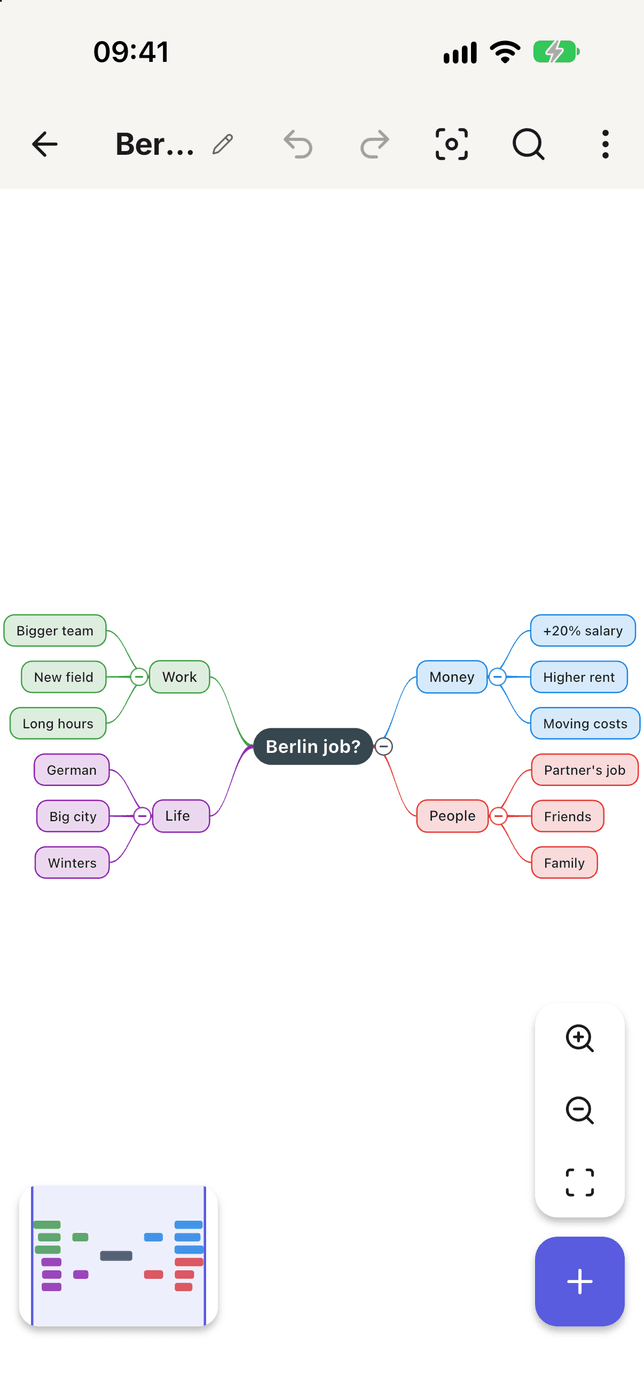
The centre decides everything below it, and the commonest mistake is making it too big. “My career” gives you a map that sprawls in every direction and helps with nothing. “Whether to take the Berlin job” gives you one with an answer at the end.
A good centre is a question or a bounded thing: a book, a project, an essay, a trip, an exam topic, a decision. If you can’t fit it on a sticky note, it’s two maps.
Step 2: Draw the main branches first
Before you go deep anywhere, put down the main branches all around the centre. This is the step people skip, and it’s why their maps end up lopsided: one branch with forty sub-topics and four branches with none, because the first idea got all the attention.
Aim for three to seven. Fewer than three and the subject didn’t need a map; more than seven usually means some of them are sub-topics of others. If you’re stuck, the usual questions work: who, what, why, when, how, what if.
Step 3: Branch outward, a few words at a time
Now go deep. The rules that make a map readable are about keeping each branch small:
- Keywords, not sentences. “Rent too high” rather than “The rent in central Berlin is significantly higher than here”. A sentence on a branch is a paragraph trying to escape; put it in a note on the topic instead.
- One idea per branch. If a label has “and” in it, it’s two branches.
- Children are parts of their parent. Everything under “Costs” should be a cost. When something isn’t, it’s in the wrong place, and noticing that is half the value of mapping.
Don’t stop to tidy. The first pass is for getting things out of your head; order comes later.
Step 4: Rearrange, then prune
Once the page is full, read it from the centre outward and ask of each branch: is this where it belongs? You’ll find duplicates on two branches, a sub-topic that is really a main branch, and a whole branch that belongs to a different map. Move them.
Then prune. A map with everything on it is a list with lines. If a branch doesn’t help with the question in the centre, delete it, or collapse it out of sight. When a map has become unreadable, pruning is almost always the fix.
Step 5: Turn it into something
A mind map is good at one job: showing how a subject breaks down. It is bad at sequence, bad at detail, and bad at comparing options side by side. So the last step is to take it somewhere else:
- An outline, for writing. The main branches become headings.
- A task list, for a project. The leaves become tasks.
- A table, for a decision. The branches become columns.
- Recall practice, for studying. Redraw it from memory and compare.
If you find yourself drawing arrows between distant branches, you may want a concept map rather than a mind map; the difference is here.
Paper or app?
Paper is better for the first five minutes. Nothing beats a pen for speed, and drawing by hand seems to help some people remember what they drew, which is why studying with mind maps often starts on paper.
An app is better for everything after that:
- Moving things. Rearranging is the most valuable step, and on paper it means starting again.
- Size. A map that outgrows the sheet on paper just keeps going on a screen, and branches collapse so you can see the shape.
- Getting it out. An outline, a PDF, an image, a Markdown file, without retyping.
- Starting. Some apps can draft a first map from one sentence, which helps with the blank-page problem, as long as you then edit it into your own. Free AI generators are compared here.
In Smart Mind, you can build the map topic by topic on the canvas, or open the Outline view and type an indented list that draws itself as a map; pasting an outline you already have works too. All eight layouts are in the free version: the classic horizontal one, branches left and right of the centre, plus radial, top-down org chart, timeline and others, for subjects that suit a different shape.
Mistakes that make a map useless
- Starting too deep. Writing ten sub-points under the first branch before drawing the others.
- Sentences everywhere. The map becomes slower to read than the notes it replaced.
- Decorating instead of thinking. Colours and icons help once the structure is right. Before that they’re procrastination.
- Never leaving the map. If it never turns into an outline, a plan or a decision, it was a drawing.